
Product News
Recent updates and improvements within Chapter
Recent updates
Questions about our software?
Agent Skills and a Full Source Viewer for Visitors
With skills, your agent now acts when a question calls for it, from asking for missing details to pulling live data from your own systems. Visitors to your published agent can check every answer in the full source viewer, and your spreadsheets are now read as real tables.
✨ What's New
- Agent Skills – Skills tell your agent what to do when a question matches a trigger. Steps can load specific documents, ask for details, send an email, or pull live data from your systems through an API or MCP server. For now Chapter sets skills up for you, and admins get the builder once it's switched on.
- The Full Source Viewer for Visitors – Visitors to your published agent now get the same source viewer as your team, with highlighted passages, next and previous between citations, zoom and download, so they can check every answer themselves.
- Spreadsheets as Real Tables – Your agent now reads every sheet row by row, and a cited spreadsheet opens as a table with the cited rows highlighted. Reprocess older spreadsheets to get the new reading.
⚡ Improvements
- Tighter Knowledge Control – Limit any agent to tagged documents from its Knowledge tab. Agents other than your default one no longer use internal documents, so internal content stays out of their answers.
- Follow-Ups That Stay on Track – The agent keeps a short running summary of each conversation, so follow-up questions stay tied to what you're after.
- Suggested Questions in Your Language – Suggested questions now appear in the reader's language, so a Dutch team with Dutch sources sees Dutch questions.
- A Quieter Guide – The Guide remembers the tips it gave you over the past two weeks and says less as a session goes on, so it no longer repeats itself.
- Protection From Misuse – Visitors who keep misusing your public agent are now blocked automatically, and you can block or unblock any anonymous visitor from Top users in Insights.
🐛 Fixes & Stability
- Clearer Processing Status – The processing banner now counts files consistently and no longer sticks at "100% done", and big imports no longer slow down or leave files stuck halfway.
- Cleaner Website Imports – Error and empty pages are no longer saved as content. They're marked failed with the reason and can be retried from the website dashboard.
- Macro-Enabled Office Files – .xlsm and .docm files now import from SharePoint and manual upload, with macros stripped so they never run.

The Onboarding Guide and Faster Gap Fixing
Start saving time sooner with the new Guide, which walks your team through setup. You can also close knowledge gaps faster, let your experts overrule outdated documents, and make your website agent match your site.
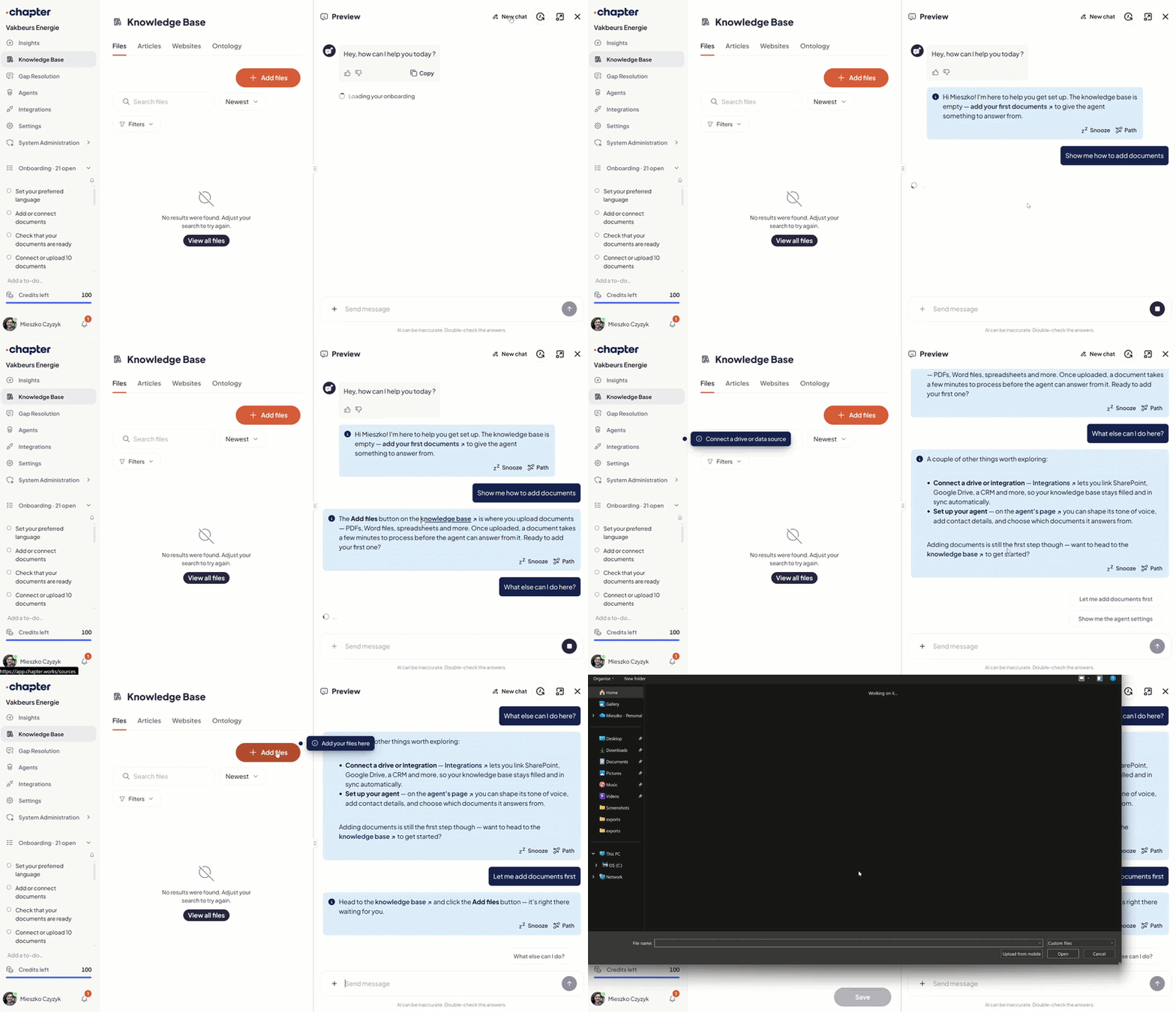
✨ What's New
- The Onboarding Guide – A new agentic Guide helps your technical support and service teams learn to use Chapter. It suggests next steps based on your progress, answers questions like "How does the knowledge base work?", and can be snoozed until you're ready.
- A Guide That Knows Your Setup – The Guide knows each agent's settings, links you straight to the right settings tab, and sees who has added what to your knowledge base. A shared checklist ticks off steps as your team completes them, in several languages. It replaces the old setup flow.
- Faster Gap Fixing – Gaps are now fixed one question at a time, not by whole topic, so each fix is precise and immediate. The gap inbox groups gaps by topic with filters and bulk selection, so archiving 100 old gaps takes one action.
- An On-Brand Website Agent – Published agents can match your site's font and theme colours with a live preview, greet visitors at the launcher, and offer more than two starter questions.
⚡ Improvements
- Gaps That Close the Loop – Close a gap by updating an existing article, and it stays closed after later edits. Every thumbs-down, including from visitors on published agents, now creates a gap, and whoever reported it is notified in their language once the fix is live.
- Annotations That Take Priority – When an annotation contradicts its document, the agent follows the annotation and drops the outdated statement. Clicking an annotation count jumps to the right page, and annotations can be edited in place.
- Insights That Cover More – Every signed-in team member can now open Insights, and agent cards show when each agent was last asked and from where. Top Questions and the weekly AI report now cover every question people ask, not only gaps.
- WhatsApp Answers With Sources – WhatsApp replies that cite sources now include a 48-hour link that opens the conversation in the browser, where users can view the sources and keep asking.
🐛 Fixes & Stability
- Links That Go Where They Should – Source links now point only to the cited document, and "Open" links no longer expire.
- Website and Chat Stability – Website imports are more reliable, and chat outages show visitors a notice in their language.
- Weekly Report Delivery – Fixed a stall that blocked most weekly reports on Monday. Missed ones arrive on the next run.
- UX Tweaks – Smoother scrolling in the inbox and source viewer, a tablet-friendly chat, and an Insights date range that widens instead of showing nothing.
.avif)
Embed the Agent Anywhere and Smarter In-App Links
The agent can now live directly inside your own pages, chromeless and sized to fit wherever you put it, instead of only inside Chapter's own widget. This release also brings your team a weekly digest of what's being asked, smarter in-app links, and more resilient imports.
✨ What's New
- Embed the Agent Anywhere – The agent can now be embedded directly inside your own pages, chromeless and sized to fit whatever space you give it. That means a service page can put a verified answer front and center instead of a generic chat bubble in the corner, catching more visitors before they ever open a support ticket.
- Weekly AI Report by Email – A digest of what your team asked the assistant arrives in your inbox every week, with out-of-hours activity broken out separately and settings to choose who receives it.
- Clickable In-App Links – Answers that reference a page inside Chapter now link straight to it, parameters filled in automatically, so you land on the right screen instead of copying a path by hand.
⚡ Improvements
- Complete, Not Partial, Answers – Answers now pick up every entity a question names directly, instead of matching only the single closest one, so you get fewer partial or off-target answers.
- New Insights Metrics – See how much time the assistant is saving your team and how many questions get answered outside business hours, right inside Insights.
- Term Variants in the Ontology Graph – The agent graph now shows a term's alternative spellings and family variants, so you can see how your terminology connects.
- Live Member Updates – The members table now updates immediately when an invite is accepted, and invitations that are never accepted are cancelled automatically instead of lingering.
- Faster Insights – The Insights conversation table loads noticeably faster.
🐛 Fixes & Stability
- Knowledge Graph Safety Guard – Added a safeguard so a re-scan can never wipe an organization's already-ingested knowledge graph.
- Document Processing Resilience – Embedding calls now retry with a longer timeout on slow responses, and stalled document imports close themselves out instead of hanging half-finished.
- Website Import Fixes – Fixed website imports failing on large pages and image-heavy sites.
Editable Annotations and a Unified Notification Inbox
Expert annotations can now be edited, removed, and protected from accidental loss, and deleting a document finally means it's gone everywhere. This release also brings one place for every notification, self-organizing topics, and a faster path into the product for new customers.
✨ What's New
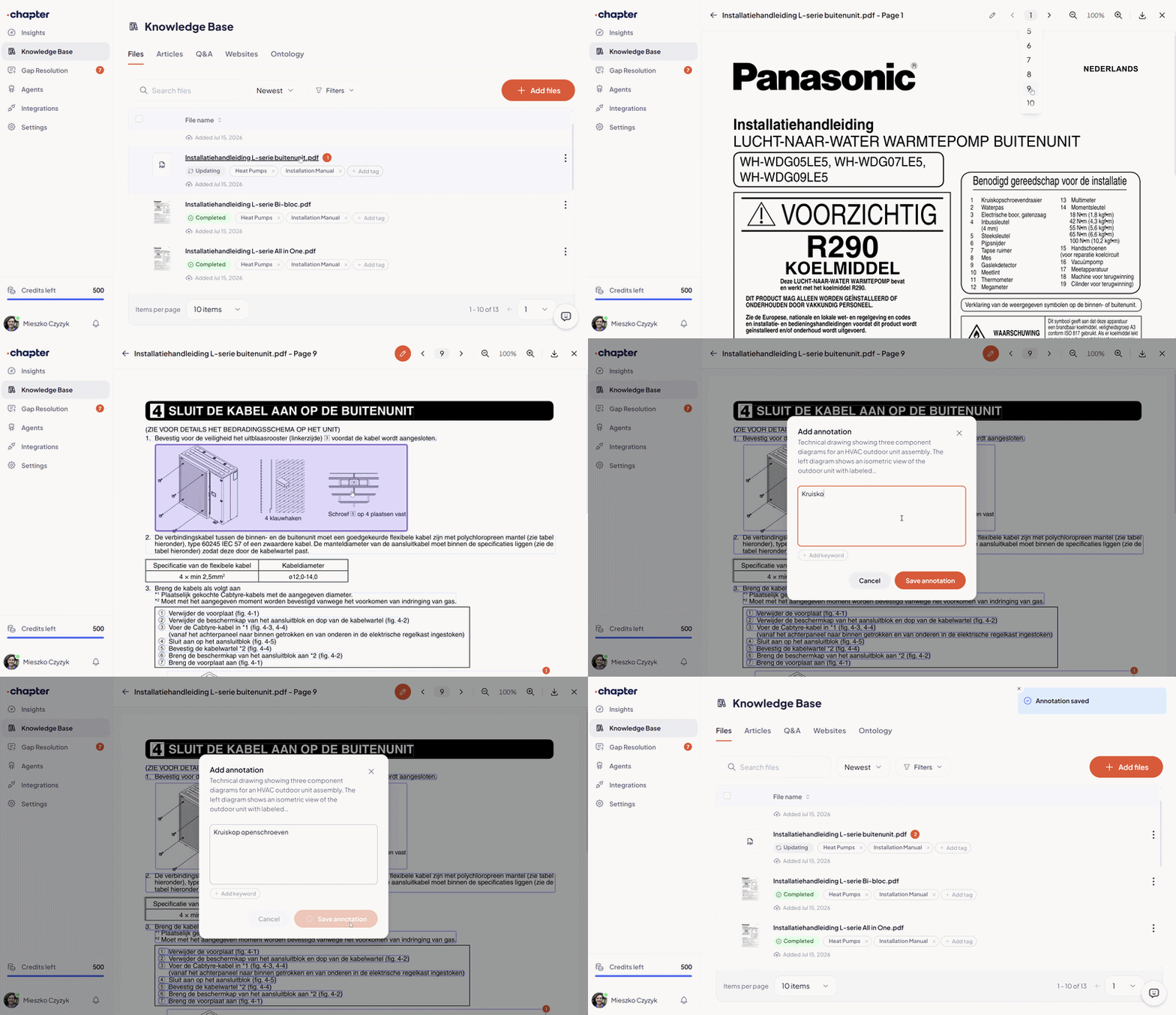
- Editable Expert Annotations – Annotations can now be edited or removed, with a confirmation step and the underlying document text cleanly restored, plus a dedicated viewer panel. Documents also show which files carry annotations, with a count and a filter to find them, and re-processing a file now warns you first, so expert knowledge is never accidentally lost.
- One Notification Inbox – A single feed and unread count now cover document processing, article publishing, knowledge scans, and gap assignments, so nothing sits scattered across the product waiting to be checked.
- Reliable Document Deletion – Deleting a document now removes it everywhere, including from every answer built on it, and deleting a large batch of documents at once now finishes in one go.
- Expert Workbench Rewrites – The expert workbench can now rewrite an answer directly, instead of only approving or rejecting it.
- Announcements to Customers – Send product announcements straight to your customers from the platform.
⚡ Improvements
- Faster Onboarding – Onboarding no longer waits on the initial knowledge scan to finish, so new customers get into the product faster and are simply notified when the scan completes.
- Topics That Organize Themselves – Topics can now split and merge as your knowledge base grows, with an hourly job keeping every organization's topics tidy automatically.
- More You Can Do from Chat – Annotate, open, and upload documents directly from a conversation, and share any answer by email. If it doesn't reach the recipient, you'll see a flag instead of assuming it went through.
- Knowledge Base Visual Refresh – Document thumbnails, a cleaner row layout, and a sort control make a large knowledge base faster to scan.
🐛 Fixes & Stability
- Invite Links – Fixed a bug where joining via an invite link could land someone in a brand-new organization instead of the one that invited them.
- Document Processing Resilience – Parsing timeouts now retry automatically and stalled jobs are reclaimed instead of failing.
- UX Tweaks – Announcements no longer repeat or get stuck open, the upload panel closes properly when you navigate away, and the "Top Questions" insight no longer reloads constantly.
Smarter Source Tagging and Instant Chat Attachments
You can now copy and paste screenshots directly into agent chat, saving you the hassle of saving files! Attached media stays neatly within the Q&A screen to keep your files list clean. Starting out is easier, too: new teams can enter their website URL on first login to populate content, then tag pages to deliver targeted answers to every customer.
✨ What's New
- Website Seeding at First Login – New organisations are asked for their website when they first sign in, so the knowledge base starts filling itself from published pages instead of waiting on the first manual upload.
- Tagging for Articles and Website Pages – Articles and web pages now carry tags like any other source, so an agent can be scoped to one section of your site rather than the whole knowledge base.
- Paste a Screenshot with Cmd+V – Screenshots paste straight into agent chat, so an error display or a section of a wiring diagram reaches the assistant without a detour through the file system.
⚡ Improvements
- Consistent Tagging Across Knowledge Types – Files, articles and website pages now handle tags the same way, so scoping an agent behaves predictably whatever the source it draws on.
- Cleaner Files List – Images and videos attached to Q&As stay on the Q&A screen instead of appearing in the Files list, so the list shows the documents your knowledge base is actually built from.
🐛 Fixes & Stability
- Members Panel – Fixed a bug that hid roughly one in five members from the Members panel, which had admins re-inviting colleagues who already had access. All memberships now display correctly.
Your Website as a Knowledge Source
Now you can point Chapter straight at your website to automatically pull in support articles, spec sheets, and linked PDFs with zero manual uploading needed! Answers link directly back to the live page, making it super simple for your team to verify sources in a single click.
Plus, Chapter captures pages exactly as visitors see them, including scroll-loaded content.
![website-as-source-short.mp4 [video-to-gif output image]](https://cdn.prod.website-files.com/6787926b3a5ee0bc6ffcaf24/6a904fdac27dfdf1e85e2352_ezgif-19d07dabace96eae.gif)
✨ What's New
- Websites as a Knowledge Source – Point Chapter at a site, select the pages you want, and they are ingested alongside your manuals, so published support articles and product pages become answerable without anyone re-uploading them as documents.
- Automatic Discovery of Linked Files – PDFs, manuals and spec sheets found on the pages you select are imported automatically, so the documents already published on your site arrive with them.
- Image Attachments for Every Customer – Photo upload in chat is now on for all tenants rather than a pilot group, so any technician can send a nameplate or error display instead of typing out a serial number.
⚡ Improvements
- Live Page Citations – Answers drawn from website content link directly to the page they came from, so verification is one click rather than a search of your own site.
- Faithful Page Capture – Pages are captured as a browser renders them, including content that only loads on scroll, so an imported page matches what a customer or installer actually sees.
🐛 Fixes & Stability
- Insights Conversation Rows – Fixed conversation rows not opening when clicked.
- Page Capture and Upload – Capture and upload now retry automatically, so one Save brings in the full selection instead of partially failing.
- Heavy Documents – Image resolution is now capped in the processing pipeline, preventing very large pages from exhausting memory and failing silently.
Photos in Chat, Guided Setup, and Clearer Citation Trails
Finding verified answers is easier than ever! Technicians can now upload a photo of a nameplate or error display directly in chat, skipping tedious serial number entry. New users get up and running quickly with guided setup and starter questions. Plus, our upgraded Answer Path view shows the exact source-to-page route so your team can verify advice in seconds.
✨ What's New
- Image Upload in Chat – You can now attach a photo directly to a conversation, so a technician can send the nameplate, error display or wiring instead of typing out a part number they can't read.
- Expert Annotations – Subject matter experts can now annotate key content inside a document, so the note from the person who knows the equipment sits with the source instead of in someone's inbox.
- Suggested Starter Questions – The empty chat now suggests questions drawn from expert-verified answers, so a first-time user sees what the assistant can answer for your products rather than guessing at a blank box.
- Onboarding Checklist – New users are walked through setup step by step, so a new support lead can connect a source and reach a first verified answer without a call.
- Add to Home Screen (iOS) – A step-by-step video walkthrough for saving Chapter to the iOS home screen, so field engineers open it like an app on site instead of digging for a bookmark.
⚡ Improvements
- Answer Path View – The view showing how the AI found an answer now has clearer citations and a clickable path through each step, so you can check the route to a source, not only the source itself.
- Citations in the Embedded Widget – Citation bulbs in the website widget now open the correct source document directly, so an installer on your portal can verify a page without leaving it.
- File Status in the Knowledge Base – Files now show explicitly when they are disabled or being deleted, so you can tell at a glance why a document has stopped appearing in answers.
- PDF Requests – Asking the assistant to send a document now points straight to the citation link, so the file is one click away instead of a request that goes nowhere.
- Transactional Emails – Invites and notifications now use one consistent template, so an invite landing in an installer's inbox is recognisably from you.
🐛 Fixes & Stability
- Chunk-to-Source Matching – Corrected the document-processing pipeline so chunk embeddings stay tied to their source content, keeping page citations pointed at the passage the answer actually came from.
- Team Invites – Fixed a bug where accepting an invite could attach the user to the wrong account.
- Knowledge Base File List – Fixed the file list occasionally rendering blank.
- File Actions Menu – Fixed a sizing issue that clipped options in the menu.
- Handover Messages – Handover no longer pulls in untracked users, so tickets are raised against the right contacts.
- File Deletion & Sync – Deleted-file cleanup now runs in batches and no longer competes with active ingestion. Race conditions in cleanup and rollback ordering are fixed and legacy sync paths retired, for more predictable syncs on large document sets.
Spreadsheets and Word Docs as Sources, Plus Precise Sync Control
You can now upload and sync spreadsheets, Word docs, CSVs, and images right alongside your manuals, with citations down to the exact page. We also updated the file browser with easier filtering and faster folder navigation. Best of all, smart folder syncing reconciles existing content without reprocessing it, saving you time and duplicate costs!
✨ What's New
- Spreadsheets, Word Documents and Images as Sources – Docx, images, spreadsheets and CSVs can now be uploaded manually or picked up in an integration sync, and they appear in the ontology sources view alongside PDFs and video, so the parts list or error-code table that lives in Excel becomes answerable instead of sitting outside the knowledge base.
- File-Type Filter at Sync Time – You can now choose which file types come across when you sync a folder, so connecting a shared drive doesn't drag in every CAD export and image alongside the manuals.
- Ingestion Paused States – Files held back by a credit or file limit now carry an explicit paused state, with a banner in the app and a block on article publishing, so you learn that ingestion has stopped from the product rather than from a missing answer.
⚡ Improvements
- File Browser Overhaul – Expand and collapse whole trees, select folders and subfolders with undo, click a search hit to jump to its folder path with breadcrumbs (including Google Drive), and see file-type information per item, so scoping a sync across a large SharePoint structure is a few clicks rather than a scroll.
- Reselection Reconciles Instead of Rebuilding – Changing your folder selection now reconciles against what's already ingested rather than starting over, and duplicate files repoint safely, so re-scoping a sync doesn't reprocess documents you have already paid to ingest.
- Integration-Wide Sync Now – One action refreshes every connected folder in an integration, so a batch of updated service bulletins goes live without visiting each folder in turn.
- Resync Confirmation with File Counts – Before a resync runs, you see how many files it will affect, so there are no surprises in the credit ledger afterwards.
- Mobile Chat – Full-width answers, scrollable tables, a fixed header, and source images that no longer shift while an answer streams, so a technician checking a specification table on a phone can actually read it.
- Insights Feedback Detail – Thumbs-down feedback text is now visible next to the rating, and expanded Q&A is de-duplicated, so you can see why an answer was marked unhelpful instead of only that it was.
🐛 Fixes & Stability
- Source Viewer – Image, docx and spreadsheet sources no longer return a 404 when opened from a citation.
- Queued on Arrival – Uploaded and synced files now enter a queued state and are admitted for processing automatically, so the status shown in the knowledge base reflects where a file actually is.
- Duplicate Files – Files now carry a fingerprint at ingestion, the basis for recognising the same document when it arrives from more than one connected source.
